



Ask an in-house team how a vendor contract reaches them and you’ll hear some version of the same answer: a Slack message, an email with an attachment, a ticket in a support tool, or a rep stopping by. Somebody on legal reads each one, works out what kind of request it is, chases the missing details and decides who needs to look at it. Then the request waits while it moves between people.
Smahane El Yacoubi runs legal at 7th Level, the sales-training company behind the NEPQ methodology. Before Aline, the team ran contract origination through ClickUp, and redlines had become a drag on deal velocity.
“Prior to Aline, the contract workflow was a heavily manual process. It created a frustrating and cumbersome process for the B2B team.”
Smahane El Yacoubi, Head of Legal at 7th Level

7th Level rolled Aline out on the sales side first, then added templates, approval workflows and a central repository. At Lift, the e-foil company, sales reps launch partner agreements themselves, and Lift says that saves each rep one to two hours for every new affiliate.
Most legal workflow software automates routing with forms, rules and notifications, and a lawyer still reads each request and decides what it needs. Aline’s workflows now hand some of that reading and deciding to Aline AI, following instructions your team writes.
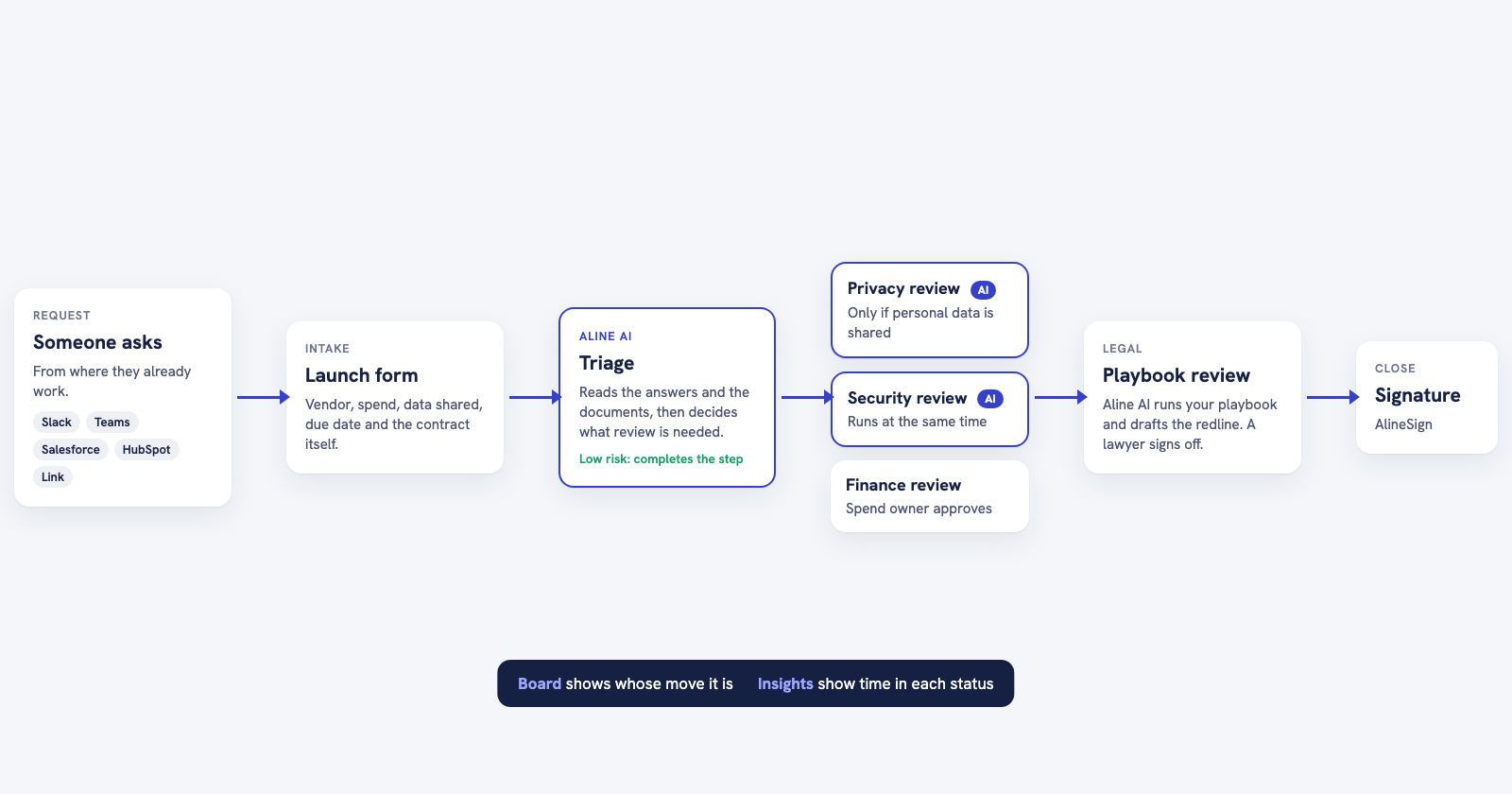
These features shipped between July and October 2026.
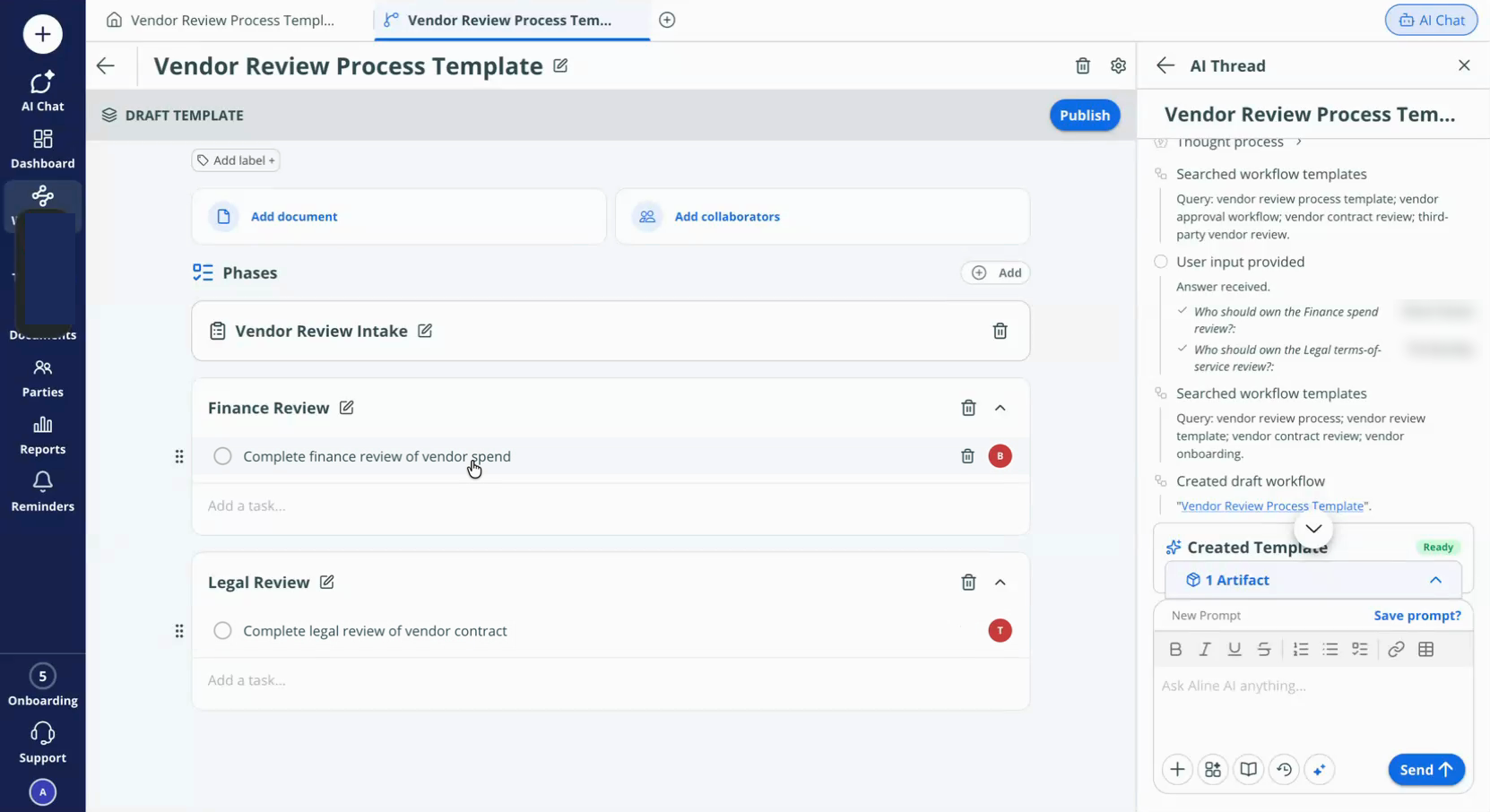
Describe the process in AI Chat, for example: create a vendor review process: finance reviews spend, legal reviews the terms, and add an intake form that requires the vendor contract. Aline drafts the whole template: the intake form, the review phases, who owns each one and the AI steps. It asks you who should own each step and shows you the plan before it builds anything. You can then wire your playbooks into any phase.
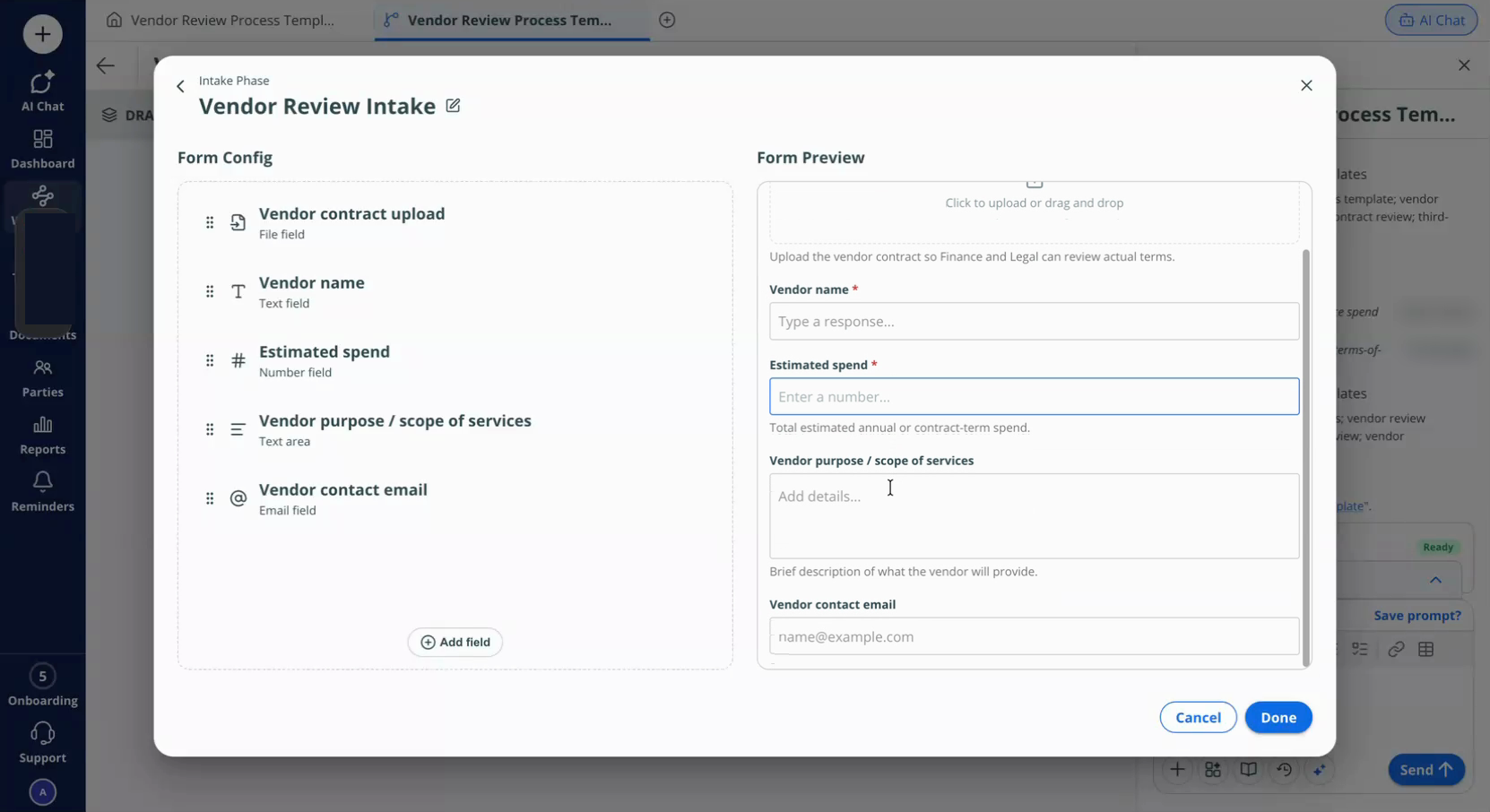
The intake form collects what the AI needs to act on: what the vendor does, whether it will access your systems, whether personal data is shared, the spend, the due date and the contract itself.
Then any task in the workflow can be assigned to Aline AI. The task description is its instructions.
| Aline AI can | Example |
|---|---|
| Read the intake answers and attached documents | Check whether the vendor will receive personal data |
| Complete a task | Close the privacy step when no personal data is involved |
| Assign a person | Send the security review to your security lead when the vendor gets system access |
| Leave a comment | Explain why it routed the request the way it did |
| Run a playbook or skill | Run your NDA playbook on an incoming draft before a lawyer opens it |
| Draft a redline | Add the counterparty’s requested change as a tracked change for a lawyer to accept |
Privacy and security checks can run at the same time instead of one after the other, and low-risk requests move forward without waiting for anyone.
30 seconds
For a business user to start a vendor review from Slack. Legal gets a triaged workflow with the playbook review already run.
Source: Aline release notes, July 2026
Every review task shows who was asked, when they responded and what they asked for. Counterparties can review without an Aline account: add an external email as a required reviewer and they get a link to comment, approve or request changes. Internal notes and the AI’s instructions stay in a separate lane the other side never sees. When pushback comes in, split it into subtasks and assign them to your team, outside counsel or Aline AI.
A request can start in Aline, from a Salesforce Opportunity, from HubSpot, from a shared link, or in chat. In Slack, @mention Aline and describe the request ("onboard a new vendor"): Aline picks the template, collects the intake and takes the upload without anyone leaving Slack. The Microsoft Teams assistant installs once for the whole workspace.
For the legal workflow management side, Boards give each pipeline its own columns, like NDAs, vendor reviews and order forms, with custom statuses such as "With counterparty" and a triage column for new requests. Link workflow phases to columns and cards move on their own. Workflow Insights then charts open work by type, assignee and status, flags anything open longer than 90 days, and shows the typical time spent in each status, so you can see whether contracts sit with legal, finance or the counterparty.
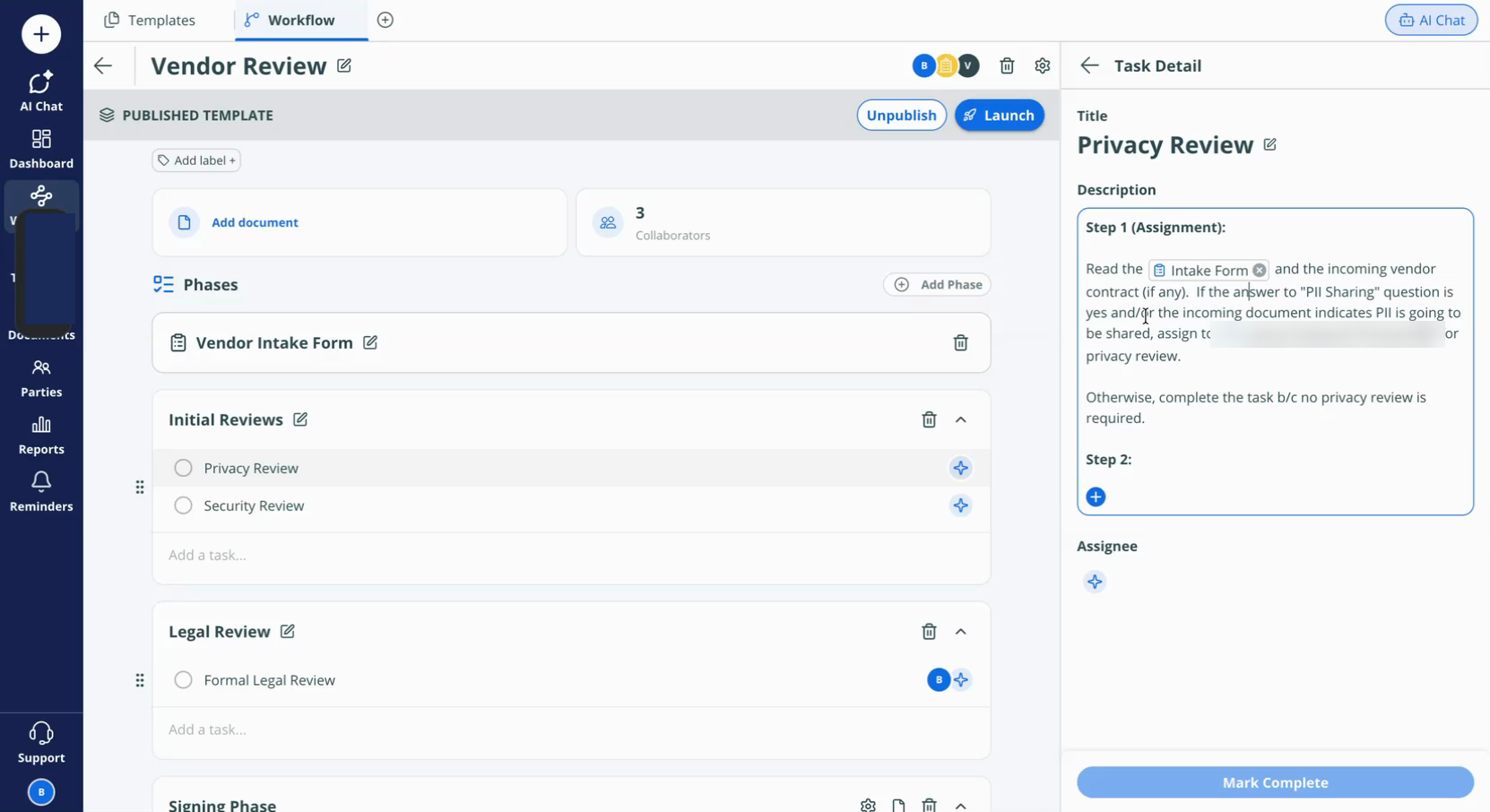
Yes/no and single-select intake questions give the AI much more reliable routing than open text fields. One setup detail: when the AI routes a task to someone, that person isn’t automatically added as a collaborator on the workflow, so add your likely reviewers to the template up front.
/launch-template), from Teams, from a Salesforce Opportunity or from a shared link.Here’s the whole build, from sentence to template, in under three minutes:
| Workflow | What Aline AI does | Who it’s for |
|---|---|---|
| Vendor review | Reads the intake and contract, runs privacy and security checks in parallel, routes spend to finance and terms to legal | Procurement, legal, security |
| Incoming NDA | Runs your NDA playbook on the counterparty’s draft and prepares the first-pass redline before a lawyer opens it | Legal |
| Sales order form | Fills the order form from the Salesforce Opportunity and its quote, then routes non-standard terms to legal | Sales, deal desk |
| Offer letter | Fills employee details from your HR system (HiBob, Gusto, Rippling, Sage HR or Workday) and routes for approval | HR |
| Contract approval workflow | Sends the contract to finance, sales leadership or the business owner, and tracks each request for changes until it’s approved | Finance, business owners |
A lot of workflow software for legal teams is a routing engine with a form in front of it. That helps until a request doesn’t fit the rules, which in legal covers most of the interesting ones. Most of the time goes into reading the request and the contract and deciding what it needs, and rules can’t read a contract.
So we made Aline AI a task owner inside the workflow. It reads the same intake answers and documents a paralegal would, follows written instructions your team can review and change, and leaves a record of what it did.
We’d keep two limits. First, let the AI complete steps only where the answer is clear from the intake, like "no personal data, no privacy review," and route anything ambiguous to a person. Second, keep a lawyer on the legal sign-off. Aline AI can run the playbook and draft the redline, but someone on your team accepts it.
If you’re starting from scratch, start with one workflow. Vendor review is a good first choice because the intake questions are predictable and the routing rules are easy to write down.
AI legal workflow automation uses AI inside a legal workflow to do work a person would otherwise do by hand: reading the intake answers and the contract, deciding which reviews are needed, completing low-risk steps, routing the rest and drafting first-pass redlines. Traditional legal workflow automation moves the request between people with forms and rules. AI adds the reading and deciding.
Start with high-volume workflows that have predictable intake questions: vendor and procurement reviews, incoming NDAs and sales order forms. They have clear routing rules (personal data shared, spend over a threshold, non-standard terms), so the AI’s decisions are easy to check. For more ideas, see these legal workflow examples.
A contract lifecycle management (CLM) tool covers the contract itself: drafting, negotiation, signature and the repository. Legal workflow automation covers the process around it: intake, triage, routing and approvals. Aline does both in one place, so a request, its contract and its approvals stay together.
In Aline, Aline AI completes only the tasks you assign it, following your instructions, such as closing a privacy step when no personal data is shared. Legal sign-off and accepting redlines stay with your team.
Yes. Add the counterparty’s email as a required reviewer on a task. They get a link to open the document, comment, approve or request changes, and they only see what you share with them.
You can generate a working template from a description in AI Chat in a few minutes, then refine the intake fields, owners and AI instructions. Most of the time goes into writing clear routing rules.
Agentic workflows, AI tasks, Reviews, Boards and Insights are live in Aline. The setup guides are in the help center:
Comparing tools? See our roundup of legal workflow automation software. Order forms that start in Salesforce? See Salesforce contract management in Aline. Want the review steps to run your team’s own methods? Read about AI Skills synced from GitHub.
If you’re not on Aline yet, start a free trial, no credit card required, or book a demo and get 2 months free.